New versions

DPGW 0.27

Significant changes in this version

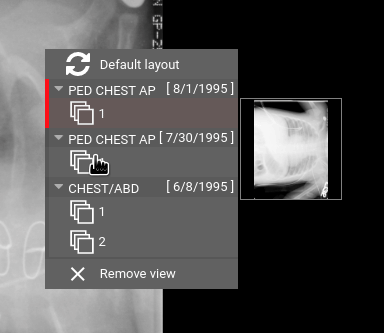
  • Context menu improvement in the browser panel – after right-clicking on the browser panel, the series currently offered for viewing are divided by studies. Individual studies can be collapsed, the item displayed in the panel in which the context menu was displayed is highlighted and thumbnails of individual series are shown when pointed at with a cursor
  • Volume creation support from Enhanced CT Image Storage – volume data from CT slices that are stored in one multiframe object can be loaded

Publishing information

  • DPGW 0.27.02-REL published on September 25, 2020
  • DPGW 0.27.03-REL published on September 30, 2020
  • DPGW 0.27.04-REL published on October 8, 2020
  • DPGW 0.27.05-REL published on October 23, 2020
  • DPGW 0.27.06-REL published on October 26, 2020

  • DPGW 0.27.07-REL published on October 30, 2020
  • DPGW 0.27.08-REL published on November 9, 2020
New versions

DPGW 0.26

Significant changes in this version

  • Access control according to a type of operation and assigning static permission – permissions can be added not only under defined policies, but permissions can also be granted to a specific user for a specific study. The rights can then be scaled up, for example so that the user can view the study but not edit or export it
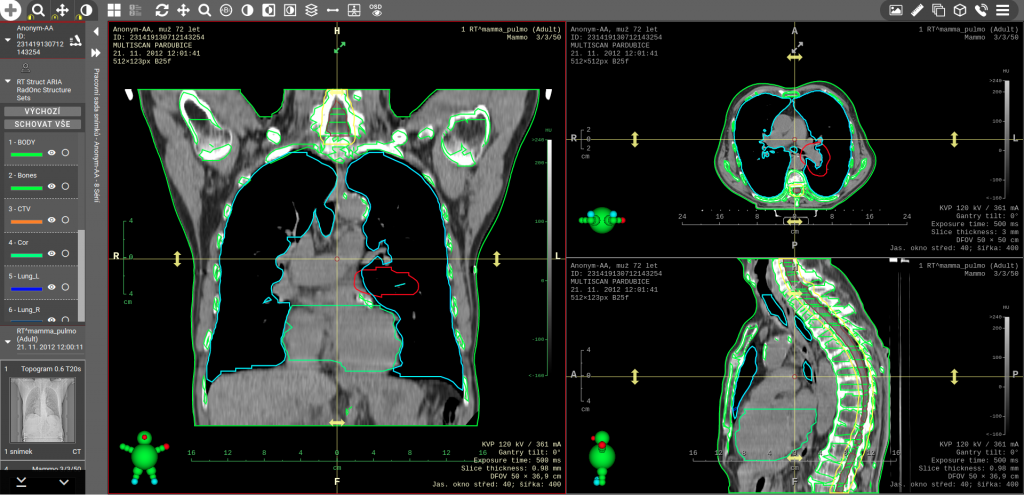
  • Support of RTSTRUCT viewing – a simple double-click on a series with the RTSTRUCT modality will load the corresponding volume sections and display the loaded contours on images from the acquisition plane and multiplanar reconstructions perpendicular to this plane. Individual contours can be hidden or highlighted
  • Option to save the existing viewing as a Hanging Protocol – after activating this function, the existing layout of monitors and display panels will be saved into a new Hanging Protocol. This protocol is then automatically used when opening studies of the same modality, together with the same values of Study Description as the currently open reference study
  • Impersonate feature – for support purposes, it is sometimes necessary to test a feature with the same rights as a specific user. The Impersonate feature allows administrators to log in with the same rights and settings as a specific user whom they support. All operations are audited under the user who activated the Impersonate function so that this function cannot be misused
  • LUT Modality support – in addition to the already supported VOI LUT display, image display with a custom LUT Modality definition is now supported as well. LUT Modality is a table that can be used to nonlinearly convert values stored in image pixels to for example HU density values

Publishing information

  • DPGW 0.26.03-REL published on September 15, 2020
  • DPGW 0.26.04-REL published on September 18, 2020

New versions

DPGW 0.25

Significant changes in this version

  • Multi-level authentication – a higher level of user login security where the user must enter a one-time password generated by his phone in addition to his own password. The function is optimally usable for logging in by contract workers outside the network environment of the hospital (more information can be found in our article named Options for External Data Access).
  • Editing and approving structured reports – it has been possible to write reports in the Dicompass browser for a long time. Now, the option of creating reports marked as drafts has been added. The draft can then be further modified and must be approved by the user with the rights to finalize reports. This makes it easy to provide a so-called “second reading.” The created report can be automatically exported to the Hospital Information System (HIS) or Medical Records Archive (MRA) using the HL7 ORU message or another interface (e.g. DASTA format).
  • Memory intensity optimization when using Groovy scripts – in organizations where a large number of Groovy scripts are used to manipulate received data (e.g. automatic work lists, unification of birth certificate number, automatic merging or moving of studies, etc.), updating to this version will lead to drastic reduction of memory requirements due to the use of caching of individual scripts.


Note: This is only a list of the most interesting functions. A complete list of new features, changes and bug fixes is always distributed to the organization based on an individual agreement.

Release information

  • DPGW 0.25.06-REL released on August 6, 2020
  • DPGW 0.25.07-REL released on August 19, 2020
  • DPGW 0.25.09-REL released on August 26, 2020