Access control according to a type of operation and assigning static permission – permissions can be added not only under defined policies, but permissions can also be granted to a specific user for a specific study. The rights can then be scaled up, for example so that the user can view the study but not edit or export it
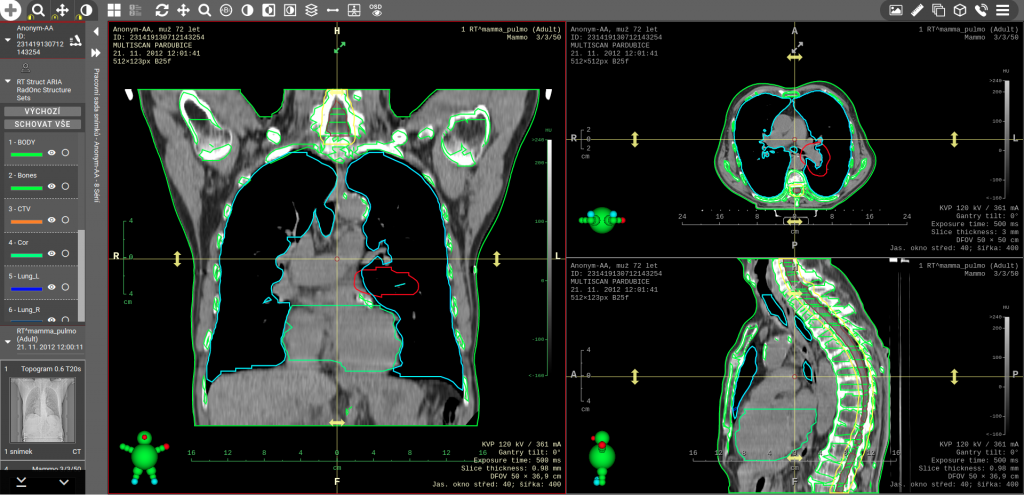
Support of RTSTRUCT viewing – a simple double-click on a series with the RTSTRUCT modality will load the corresponding volume sections and display the loaded contours on images from the acquisition plane and multiplanar reconstructions perpendicular to this plane. Individual contours can be hidden or highlighted
Option to save the existing viewing as a Hanging Protocol – after activating this function, the existing layout of monitors and display panels will be saved into a new Hanging Protocol. This protocol is then automatically used when opening studies of the same modality, together with the same values of Study Description as the currently open reference study
Impersonate feature – for support purposes, it is sometimes necessary to test a feature with the same rights as a specific user. The Impersonate feature allows administrators to log in with the same rights and settings as a specific user whom they support. All operations are audited under the user who activated the Impersonate function so that this function cannot be misused
LUT Modality support – in addition to the already supported VOI LUT display, image display with a custom LUT Modality definition is now supported as well. LUT Modality is a table that can be used to nonlinearly convert values stored in image pixels to for example HU density values